Desk & Tech
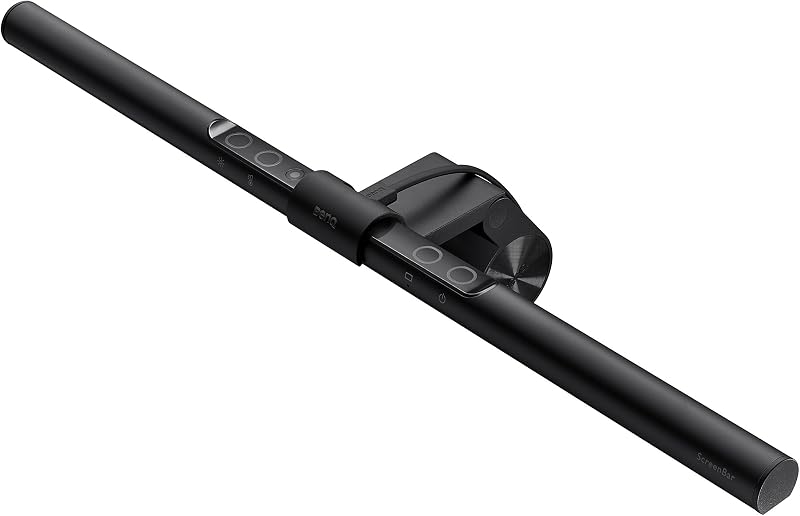
BenQ ScreenBar Monitor Light Bar
$99-109
The price is high for a light, but it solves the glare-and-clutter problem cleanly for a monitor setup.
Affiliate linkThe best monitor light bar for eye strain in a small home office is a monitor-clamped bar, not a desk lamp — the asymmetric-optic trick that lights your desk without bouncing glare off the screen, the honest catch, and who should skip it.
For a small home office where eye strain comes from screen glare and there's no room for a lamp, the best monitor light bar is the BenQ ScreenBar. It clamps to the top of your monitor — zero desk footprint — and its asymmetric optic throws light down onto the desk without reflecting glare back off the screen, which is the specific mechanism that eases eye strain a desk lamp can't fix.
Disclosure · As an Amazon Associate, BlackBox Supplies earns from qualifying purchases — at no extra cost to you. See our full disclosure.
Eye strain at a desk usually isn't about too little light — it's about the wrong light hitting the wrong surface. In a small home office you're typically working in a dim room, at night, or with one window, and the fix people reach for is a desk lamp. The problem is that a lamp bright enough to read by is also bright enough to reflect off your monitor, and now you're squinting through a bright reflection layered over your work. That contrast fight — a lit desk against a glowing screen with a reflection on it — is a classic driver of what optometrists call computer vision syndrome (dry, tired, aching eyes after screen work).
A monitor light bar attacks the actual cause. It clamps over the top edge of the monitor and aims light down and forward onto the desk, keyboard, and any papers — but not at the screen and not into your eyes. You get enough light to read a notebook and see your keys without adding a single reflection to the display. In a cramped setup it also does something a lamp can't: it takes up zero desk space, because it lives on hardware you already own.
That combination — no glare on the screen, no desk footprint — is exactly why a light bar is the better tool than a lamp for this specific situation. It doesn't light your whole room and it isn't a reading lamp. It solves the narrow, real problem of a glare-strained worker at a small desk.
Two design choices do the work, and it's worth understanding both before you spend three times what a basic lamp costs.
First, the asymmetric optic. A normal lamp bulb throws light in a wide cone in every direction, including backward and upward — straight at the screen and into your eyes. A light bar's optic is deliberately lopsided: it projects light forward and down onto the desk while cutting off the light that would travel back toward the display. That's the anti-glare trick. The bar can sit six inches above your screen and still leave the screen surface dark, because almost no light is aimed at it.
Second, the mounting. The bar hangs off a weighted clip that perches on the top bezel of the monitor, counterbalanced so it doesn't tip forward. Because it rides the monitor, it reclaims the desk real estate a lamp base would eat — the entire reason it suits a small or dual-monitor desk. Nothing sits on the desk, nothing gets knocked over, and the light is always aimed at your work no matter how you slide the keyboard around.
A light bar isn't a free win, and the reasons it might not be for you are specific. We pulled these straight from the ScreenBar's own design constraints, not from a wishlist.
It's USB-powered, so it needs a spare port. The ScreenBar draws power over a USB-A cable — from your monitor, laptop, dock, or a USB wall adapter within cable reach. There's no separate power brick, which is tidy, but it does occupy a USB port. If every port on your setup is already full, factor in a small hub or a wall adapter. The same USB feed powers the auto-dimming ambient sensor, so there's no battery to keep charged — but there's also no cordless option.
It lights the desk, not the room. This is the point of the product, but it's a limitation if you expected otherwise. The asymmetric optic that kills screen glare also means the bar won't brighten the corners of the room, won't work as a reading lamp in an armchair, and won't light a second person's side of a shared desk. It illuminates the zone directly below your monitor and little else.
It's premium-priced for a light. At roughly $99–109, the ScreenBar costs about triple a basic $20–30 desk lamp that also, technically, produces light. You're paying for the zero-glare optic, the auto-dimming sensor, and the no-footprint mount — not for lumens. If the glare-and-clutter problem is real for you, that's money well spent; if it isn't, a lamp is the honest cheaper answer.
This is a targeted tool. Match it to your actual desk before you buy — the wrong buyer returns it, the right buyer wonders how they worked without it.
| If you… | Verdict | Why |
|---|---|---|
| Run dual monitors or a cramped desk | Buy it | Zero desk footprint is the whole advantage when there's no room for a lamp base |
| Rent / can't drill or clamp a lamp | Buy it | The weighted clip needs no screws, no drilling, and no permanent mount |
| Get glare on the screen from every lamp you've tried | Buy it | The asymmetric optic is built for exactly this — it lights the desk without hitting the display |
| Work at night or in a dim room | Buy it | Adds task light plus an auto-dimming sensor so the bar itself doesn't become a glare source |
| Need to light a whole room | Skip it | It only illuminates the desk zone below the monitor — buy a room light or floor lamp instead |
| Want a reading lamp for a chair or bed | Skip it | It's fixed to the monitor and aimed at the desk — useless away from the screen |
| Have a curved, ultra-thin, or all-in-one screen (e.g. iMac) | Skip / check first | The clip is engineered for flat-backed panels and perches poorly on those shapes |
| Just want cheap task light and get no glare today | Skip it | A $20–30 desk lamp already solves your problem — you don't need the optic |
The bar only does its job if it's set up right. This is the five-minute routine that turns "a light on my monitor" into "no glare and no eye strain."
The honest head-to-head. A lamp isn't wrong — it's just the wrong tool for a glare-strained, space-starved monitor desk.
| Monitor light bar | Desk lamp | |
|---|---|---|
| Desk space used | None — rides the monitor | A base or a clamp footprint |
| Screen glare | Designed to add none (asymmetric optic) | Commonly reflects onto the screen |
| Best at | Lighting the desk zone for screen work | Lighting a room area or reading in a chair |
| Power | USB (needs a spare port) | Wall outlet |
| Dual-monitor / cramped desk | Ideal | Often no room for it |
| Recently seen at | ~$99–109 | ~$20–40 |
The BenQ ScreenBar is our pick for the small-office, glare-strained buyer because it's the cleanest execution of the mechanism this whole article is about: clamp over the monitor, asymmetric light onto the desk, auto-dimming sensor, no desk footprint. We research from BenQ's published documentation and long-term owner reviews — we haven't personally lab-tested it and won't pretend to. Price is approximate and moves with sales.
One buying note that decides fit for a lot of people: check your monitor's top edge first. The base ScreenBar's touch controls handle brightness and color temperature on the bar itself; the wireless remote and rear back-glow belong to the pricier ScreenBar Halo, so don't overpay for features you won't use. And if you can live without the auto-dimming sensor, cheaper no-name clip-on bars do the same asymmetric-light trick for around $30 — confirm your top edge is flat before you go that route.
$99-109
The price is high for a light, but it solves the glare-and-clutter problem cleanly for a monitor setup.
Affiliate linkGlare is one cause of eye strain; the other is a screen sitting too low, which drops your head and neck and drags your gaze down all day. A light bar fixes the light — it can't fix the height. If your monitor or laptop sits below eye level, pairing the bar with a stand that raises the display to eye level removes the second half of the problem. It's the natural companion buy for a small home office, and it's a cheap one.

$45-60
Raises your laptop screen almost 6 inches to eye level so you stop hunching, and the solid aluminum body doubles as a heat sink to keep it cool.
Affiliate linkFor screen work in a small office, yes. A desk lamp bright enough to read by usually reflects glare onto the monitor, and that reflection is a common cause of eye strain. A light bar's asymmetric optic lights the desk without hitting the screen, and it uses zero desk space. A desk lamp is still the better choice if you need to light a room or want a reading lamp away from the screen.
It removes screen glare and evens out the brightness in your field of view. The asymmetric optic aims light down onto the desk and keyboard rather than back at the display, so no reflection forms on the screen, and the auto-dimming sensor keeps the bar from becoming a bright spot that fights your monitor in a dim room. Your eyes stop constantly re-adjusting between a bright screen and a dark desk.
Over USB. It draws from a USB-A port on your monitor, laptop, dock, or a USB wall adapter, so there's no separate power brick — but it does occupy a USB port within cable reach. There's no battery to charge, and no cordless option.
The ScreenBar's clip is engineered for flat-backed monitors and seats securely on those. On a curved or ultrawide panel it can balance on the flattest part of the top edge, but the fit is less stable, and a very thin or all-in-one screen like an iMac is a poor match. Check your monitor's top edge before buying.
Skip it if you need to light a whole room, want a reading lamp for a chair or bed, or get no screen glare from your current setup — a $20–40 desk lamp does those jobs for far less. Also skip it, or check fit carefully, if you have a curved, ultra-thin, or all-in-one screen the clip won't grip.
Research-driven: our picks come from verified manufacturer specs and long-term owner feedback. How we work: our methodology.
The car, power, cooling, and work-utility gear worth owning — with the honest catch on each. One genuinely useful email a week. No spam, no fake reviews, unsubscribe anytime.