The Best Desk Upgrades for Working From Home (2026)
Four upgrades that fix the real problems of a home desk — eye strain, cable chaos, dead batteries, and lost gear — chosen from verified-buyer reviews and spec sheets.
The short answer
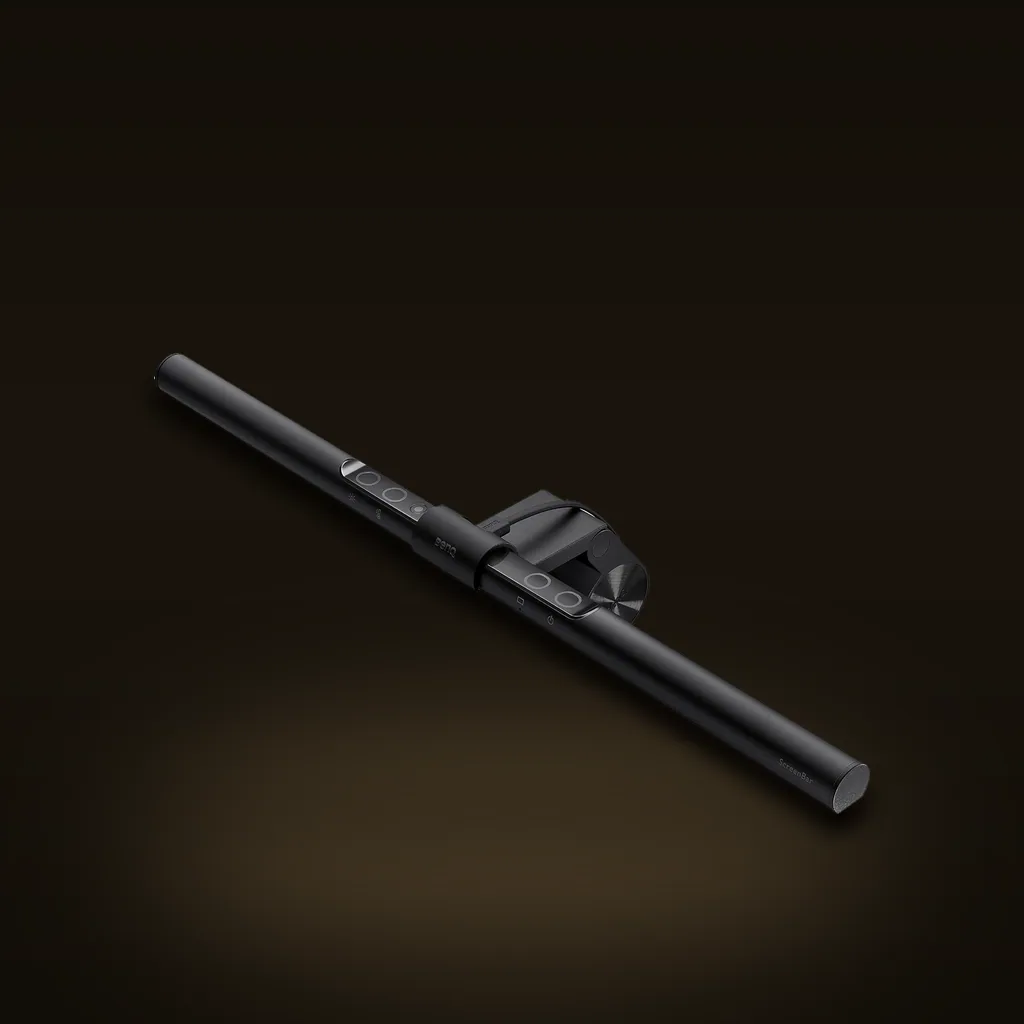
If you upgrade one thing on your home-office desk, make it the BenQ ScreenBar Monitor Light Bar ($99-109). It clips over any monitor, throws glare-free light onto your work instead of your screen, and frees the space a lamp used to eat. Below it: our picks for charging, portable power, and tracking to finish the setup.
Disclosure · As an Amazon Associate, BlackBox Supplies earns from qualifying purchases — at no extra cost to you. See our full disclosure.
The one-desk method
A home desk doesn't need a dozen gadgets. It needs to fix four things you feel every day: eye strain from bad light, a nest of charging cables, a phone that dies the moment you step away, and the ten minutes a week you lose hunting for keys, a badge, or a bag.
To choose these, we cross-checked verified-buyer reviews, manufacturer spec sheets — and kept only gear good enough to be the last thing you buy for that job. Every pick here is $50 or more; this is a curated setup, not a bargain bin.
The four upgrades at a glance
| Pick | Best for | Price | Key spec |
|---|---|---|---|
| BenQ ScreenBar Monitor Light Bar (BenQ) — TOP PICKCheck price on Amazon → | Lighting | $99-109 | Clips over any monitor with no desk footprint; asymmetric optics light the desk, not the screen; auto-dimming ambient sensor |
| Anker Prime 6-in-1 Charging Station (Anker)Check price on Amazon → | Charging the whole desk | $90-110 | 2 AC + 2 USB-C + 2 USB-A, 140W total, 0.7 in slim, live power-draw display |
| Anker Power Bank, 20,000mAh (Anker)Check price on Amazon → | Power away from the desk | $50-70 | 20,000mAh, built-in retractable USB-C cable + 2 ports, up to 87W fast charge (~74Wh) |
| Apple AirTag (4 Pack) (Apple)Check price on Amazon → | Never losing your gear | $70-99 | Precision Finding via U1 chip, Find My network, IP67, ~1-year replaceable CR2032 |
Top pick — lighting: BenQ ScreenBar Monitor Light Bar
The ScreenBar is the single upgrade that changes how a desk feels after dark. It clips onto the top of any monitor with no desk footprint, and its asymmetric optics aim light down onto your keyboard and notes while keeping the screen itself glare-free. An ambient sensor auto-dims it to match the room, so you set it once and forget it.
BenQ's ScreenBar family is the line Wirecutter, RTINGS, and PCMag land on for the best monitor light bar; this standard model is the value entry in that lineup at $99-109 (BenQ).
The catch: it's USB-powered, so it borrows a port from your monitor or a hub rather than a wall outlet, and it perches on the top bezel — very thin, sharply curved, or thin-topped ultrawide monitors can make the clip fit fussy. It's a wired fixture, not something you move around.
Best for charging the whole desk: Anker Prime 6-in-1 Charging Station
One flat slab replaces the power strip plus the pile of wall-warts. The Anker Prime 6-in-1 Charging Station gives you 2 AC outlets, 2 USB-C, and 2 USB-A in a 0.7-inch-thin body, up to 140W total, with a live readout of exactly how much power each device is pulling — genuinely useful for confirming your laptop is actually fast-charging.
At $90-110 (Anker) it's the hub that clears the most clutter at once, and looks intentional doing it.
The catch: that 140W is a shared budget across all six ports, not per-port. Run a laptop, phone, and tablet together and the wattage splits, so you won't hit peak speed on everything at the same instant. It's also a plug-in desktop unit — not a charger for your bag.
Best for power away from the desk: Anker Power Bank, 20,000mAh
The desk isn't the only place you work. This Anker Power Bank, 20,000mAh with Built-In USB-C Cable keeps the charging cable attached to the brick, so there's nothing to forget, plus two more ports and up to 87W of output — enough to top up a MacBook, a phone, and a second device on one charge.
At $50-70 (Anker) it's the grab-and-go companion to the desk setup, and at roughly 74 watt-hours it sits comfortably under the 100Wh airline carry-on limit.
The catch: it's a chunky brick, noticeably heavier than a slim pocket bank, and while 87W tops off a MacBook Air comfortably, a 16-inch Pro will still charge slower than its own wall adapter. Like all power banks, it has to fly in your carry-on, never checked.
Best for never losing your gear: Apple AirTag (4 Pack)
The last tax on a work setup is time lost hunting for things. Drop an Apple AirTag (4 Pack) into a laptop bag, a badge holder, your keys, and a travel case, and your iPhone walks you to each one — Precision Finding uses the U1 chip to point you the final few feet, and the huge Find My network locates anything left across town.
At $70-99 (Apple) for four, they're IP67 water-resistant and run about a year on a replaceable CR2032 coin cell — no recharging.
The catch: this is an Apple-only tracker. There's no native Android support, so if your household runs on Android, an AirTag is the wrong tag for you. And an AirTag has no keyring hole, so budget a couple of dollars for a holder or loop to actually attach it to keys or a bag.
How to choose, and what to check before you buy
Buy in the order you feel the pain. Most people should start with light (the ScreenBar), then tame cables (the Prime station), then cover the two away-from-the-desk gaps — portable power and tracking. A few things to confirm first:
- Monitor fit for the light bar: measure your top-bezel depth and note if the panel is sharply curved; very thin or ultrawide tops can make any clip-on light bar sit awkwardly.
- Port budget, not port count: on a charging station, add up the real wattage you need at once (a laptop alone can want 65-100W) rather than counting how many holes it has.
- Watt-hours for flying: a power bank's airline eligibility is set by watt-hours, not mAh — under 100Wh flies carry-on without approval, and it can never go in checked baggage.
- Ecosystem for trackers: AirTags only make sense in an iPhone household; on Android you need a cross-platform tag instead.
The bottom line
Four upgrades, four problems solved: the BenQ ScreenBar for light, the Anker Prime 6-in-1 for charging, the Anker 20,000mAh bank for power on the move, and Apple AirTags so nothing walks off. Start with the ScreenBar, add the rest as the annoyances demand, and a home desk stops fighting you.
Browse the full list at /useful.
Common questions
If I can only buy one, which upgrade matters most?
The BenQ ScreenBar. Lighting is the problem you feel every single evening, and a glare-free light bar fixes eye strain while freeing the desk space a lamp used to take. It's the pick Wirecutter, RTINGS, and PCMag all rank at the top of the monitor-light-bar category.
Will the Anker Prime charge my laptop and phone at full speed at the same time?
Not necessarily. The station's 140W is a shared budget across all six ports, not a guarantee per port. A laptop alone can draw 65-100W, so once you add a phone and a tablet the wattage divides and each device may charge a bit slower. For a single laptop, it's plenty.
Can I take the Anker 20,000mAh power bank on a plane?
Yes, in your carry-on. At roughly 74 watt-hours it's well under the 100Wh threshold airlines allow without special approval. Note the rule is set by watt-hours, not mAh — and spare batteries and power banks can never go in checked luggage, only carry-on.
Do AirTags work with Android phones?
No. AirTags rely on Apple's Find My network and need an iPhone or iPad to set up and locate them. If your household is on Android, choose a cross-platform Bluetooth tracker instead.
Do I still need a desk lamp if I get the ScreenBar?
For most desk work, no. The ScreenBar lights your keyboard, notes, and desk surface without a lamp's footprint or the glare a lamp throws onto your screen. If you do detailed craft or drawing off to one side, a task lamp can still help there.
Sources & further reading
- BenQ — Monitor Light Bars (official specs & comparison)
- Apple — AirTag (official)
- FAA PackSafe — Airline Passengers and Batteries
- Anker Prime 6-in-1 Charging Station (140W) — official product page
Research-driven — our picks come from verified manufacturer specs and long-term owner feedback. How we work: our methodology.
The gear actually worth buying — one email a week.
The car, power, cooling, and work-utility gear worth owning — with the honest catch on each. One genuinely useful email a week. No spam, no fake reviews, unsubscribe anytime.
- No spam
- One email a week
- Unsubscribe anytime